Overview
PittPrint Overview
PittPrint enables students to send print jobs from any location to PittPrint Stations (Pharos) located in/outside all Student Computing Labs, campus residence halls, and other locations across the Pittsburgh campus. Both black & white and color print jobs can be submitted from:
- Personal computers
- Computers in the Student Computing Labs
- Smartphones and tablets
After sending a print job to PittPrint, students can pick up documents by using Touchless Printing, swiping their University ID card or entering their University username and password at any PittPrint Station.
Detail
Pitt Print: Frequently Asked Questions
Who can use PittPrint?
PittPrint is available to anyone with a primary or sponsored computing account. However, only currently registered students and faculty receive a print quota each semester.
How can documents be sent to print?
PittPrint jobs can be sent in many ways. There are FAQ sections below for each of the following:
- PittPrint Client on a personal computer
- Student Computing Lab computers
- MobilePrint: My Print Center
- MobilePrint: Emailing a print job
- MobilePrint: Pharos Print App on iOS and Android devices
- MobilePrint: Google Cloud Printing for Chrome OS devices
- Direct Print from FAT32-formatted USB drive
- Pitt IT Virtual Lab
How do I pick up my print jobs?
- Go to a PittPrint Station.
- Swipe your University ID card through the card reader attached to the display, use the touchscreen to enter your University username and password, or use touchless printing.
- The PittPrint Station will display the jobs you submitted.
- Touch the screen to select the job that you want to print.
- Touch Print to print a single job.
- Touch Print All to print all of the jobs in your queue.
Note: To delete a print job, select the job and touch Delete.
- The printer will begin printing your jobs. To avoid printer jams, wait until all of your jobs are done printing before removing them from the printer's output tray.
- The screen will automatically time out or you can:
- Touch Exit on screens not attached to printers.
- Touch your username on screens attached to printers.
How do I print from a USB drive?
The printers with the touchscreen attached to the printer allow print jobs to be released from a FAT32-formatted USB drive.
- Log in to the printer as you would to release any print job.
- Insert the FAT32-formatted USB drive.
- A window will appear asking if you want to print from the drive.
- Select the file you want to print.
- Your account will be charged the same as if you printed from a computer.
- Note: File types are limited to Microsoft Office documents, PDFs, and some image files.
Can I scan or make copies?
Multifunction printers are in select locations that allow Scan to Email and Scan to USB free of charge. The multifunction printer also allows for black and white copies at the same price as printing. Note: USB drives must be formatted as FAT32 for Scan to USB.
What paper sizes does PittPrint support?
PittPrint supports US Letter (8.5″x11″) on all printers as well as Tabloid/Ledger (11″x17″) on color printers.
Is a Linux version of the PittPrint client available for download from the Software Download Service?
Linux users can use MobilePrint, Google Cloud Print through Google Chrome, or upload files to My Print Center.
Can I send double-sided print jobs to the print queue?
Yes, two-sided (duplex) sheets cost the same as a single-sheet printout. Duplex printing is enabled by default.
Can I decide to print single or double-sided when I am at a PittPrint Station?
No, you must choose double or single-sided printing when submitting your print job. Jobs submitted via email or upload can be changed using the options in My Print Center before releasing them at a Pitt Print Station.
Can I cancel jobs that are waiting in the print queue?
Yes, you can delete unprinted jobs waiting in the print queue at Pitt Print Stations, on My Print Center, or on the Pharos Printing application.
Can I cancel jobs from the printer that are currently printing?
At the older style printers (touchscreen separate from the printer), you can cancel jobs currently printing by pressing the red button on the printer. Your print quota will still be billed for any print jobs that you cancel using this method. To request that these sheets be refunded to your account (a print quota refund), you must complete the online request form at pi.tt/printrefund within 24 hours. Jobs cannot be cancelled on new style printer (touchscreen attached to the printer).
Can the PittPrint Stations print in color?
Color printers are available in the Student Computing Labs and select locations outside of the labs. You can release color print jobs at these printers. To print in color, you must use the color print client or choose the appropriate settings when using MobilePrint or My Print Center.
Can I bring my own paper to use at the PittPrint Stations?
No.
How long are my print jobs kept before they are removed from the print queue?
Your print jobs will be held in the print queue for 48 hours from the time they are first sent to the Pitt Print queue. Your print quota will not be affected by these jobs.
I am visiting from a University of Pittsburgh regional campus. Can I use PittPrint?
Yes, students from University of Pittsburgh regional campuses may use Pitt Print. However, they must enter their University username and password to access their print jobs at the printer. Regional campus ID cards will not work.
Pitt Print: Troubleshooting
Getting an error when printing?
No suitable printer available: The selected printer does not allow some of your print job's attributes '*'.
* ‘A5’ or ‘Custom’ or ‘Executive’ or ‘Legal’ or ‘Statement’ – These are all paper sizes. Pitt Print Stations ONLY support Letter (8.5 inches by 11 inches—all printers) and Tabloid (11 inches by 17 inches—Color Print Stations only) documents.
There are three options to change the document size to Letter:
- Download and install the PittPrint Client from software.pitt.edu. You can then print your document in its native program making sure the page size is set to Letter.
- Use the Virtual Lab. Does your device not support the Pitt Print Client? Go to pi.tt/virtuallab, log in and use the Pitt Print Client on our Virtual Lab.
- Convert the document to a PDF with the correct paper size (Windows only). Open the PDF—save the file to a PDF if it is not already—in Adobe Acrobat Reader (free) or Adobe Acrobat. Go to File > Print and choose Microsoft Print to PDF as the printer and make sure the paper size is set to Letter under Page Setup… Then click Print to save the document as a new PDF.
I clicked print at the PittPrint Station and my job disappeared from the queue, but didn't print. What happened?
An error occurred while sending your job from the print server to the printer. If the system detects an issue with the printer, you will be given one free reprint. Either the printer should be restarted before you release the reprint or you should use a different printer. If you need to request a print quota refund for the problem, please complete the online request form at pi.tt/printrefund within 24 hours..
My PDF file won't print. What can I do?
You can print your PDF file as an image to resolve this problem. Using Adobe Reader or Adobe Acrobat, click File>Print>Advanced>check Print As Image>OK>Print.
I just installed the PittPrint Client but did not see the pop-up window appear when I attempted to send my print job.
Restart your computer and try to print again.
I am running a virtual machine on my computer. Which operating system should I install the Pitt Print Client on?
To make use of all features, install the Pitt Print Client on the computer's primary operating system, not the operating system of the virtual machine.
What should I do when the printer has a paper jam or runs out of paper?
Printers are monitored online from 8:30 a.m.–10 p.m. daily during the standard term, excluding University holidays. Someone will come fix the printer, but it may take some time. You can restart the printer to delete your job if you wish. If you need to request a print quota refund for the problem, please complete the online request form at pi.tt/printrefund within 24 hours.
Whom do I contact if I have any questions or problems regarding Pitt Print?
For general questions about Pitt Print in Student Computing Labs, speak to a Lab Monitor. For problems experienced outside of the Student Computing Labs, please contact the Technology Help Desk at 412-624-HELP (4357).
Print Quota and Printing Costs
Currently registered students and faculty receive $63 per semester for printing. This printing quota may be used toward single or double-side printing, and black & white or color printing. Printing on black & white printers is $0.07 a sheet. Printing on color printers is $0.49 a sheet in color or $0.21 a sheet in black & White. This is equivalent to 900 sheets printed on black & white printers or about 128 sheets printed in color.
Please note: there may be differences between the estimated cost of a job in My Print Center (more information on this below) and the actual cost at the Print Station. For example, a color job will show up as $0.49 per sheet on My Print Center but will be charged $0.21 per sheet if printed in black & white on a color printer. The cost listed for a job at the Print Station is the accurate cost.
Print Quota: Frequently Asked Questions
How to I add funds to my printing account?
Additional print quota can be purchased by using using one of the Pharos Pay Stations located in the David Lawrence Hall and Cathedral of Learning Student Computing Labs. The pay stations accept only bills (up to $10) and coins (nickels, dimes, quarters, and dollar coins). Additional quota can be added via Panther Funds, credit card or cash at the Drop-In Support Desk at University Store on Fifth.
How do I view my Print Quota balance?
Available print quota balances are displayed on the Pitt Print Stations. This allows you to see your balance each time you print. You can also view your remaining print quota on My Print Center (print.pitt.edu).
Can I get a refund for my unused balance?
Purchased printing funds are refundable after graduation if the remaining balance is $5.00 or more. Refund requests must be submitted within 60 days of graduation. To start a refund request, please contact the Technology Help Desk at 412-624-HELP (4357).
Print quota received at the beginning of each term is not eligible for refunds.
Is my Print Quota the same as Panther Funds?
Print Quota and purchased printing funds are separate from Panther Funds. In order to use Panther Funds to print, you must visit the Drop-In Support Desk at the University Store on Fifth to purchase additional print funds.
My Print Center
My Print Center (print.pitt.edu) allows users to view current printing funds balance, view all jobs sent to the PittPrint queue that have not been released, view printing transaction history, and upload print jobs.
My Print Center: Frequently Asked Questions
What is My Print Center?
My Print Center lets students manage their Pitt Print service printing, including these tasks:
- View the amount of funds in your printing account
- View print jobs that are currently in your print queue
- Upload files via web browser to your queue
- Delete print jobs from your queue
- Change options for print jobs submitted via My Print Center, MobilePrint, or Google Cloud Print
- View printing history
How can I access My Print Center?
Go to print.pitt.edu and log in with Pitt Passport.
Where do I view the amount of funds currently in my printing account?
Funds are listed at the bottom of the window:
- My Funds are the total funds available to you.
- Semester Quota lists the remaining funds of the $63 that each currently registered student and faculty member is given per semester. This amount resets at the beginning of each semester.
- User Added Funds are all funds that a user has purchased for their printing account. Any User Added Funds are carried over across semesters.
How do I view the print jobs in my queue?
Once you’ve logged in to My Print Center, all jobs in your print queue are displayed, along with the following details for each job: file type, title/file name, number of pages and pieces of paper in the print job, the time the job was submitted, and the estimated cost of the job (charged when printed).
How do I upload files to be printed through My Print Center?
- Click the Upload button at the top of the Job List.
- A file explorer window will appear, choose the file to upload, and then confirm.
Note: It is recommended to only upload documents if your computer does not support the Pitt Print Client as the client provides additional features.
How do I delete print jobs from the queue?
In the Job List, highlight any jobs to be deleted by clicking the corresponding check box on the left. Then click the Delete button at the top of the Job List.
How do I change the print options for jobs in my queue?
Please note: The ability to change options for print jobs is only available for jobs that have been submitted via MobilePrint. Options cannot be changed for jobs submitted using the Pitt Print Client or printed from the Student Computing Labs.
In the Job List, highlight any job you wish to edit the options for. In the bottom-right of My Print Center you will see options you can change including Color (Color or Black & White), Pages per Side (1 or 2), Sides (Single Sided or Double Sided), Copies, and Page Range.
Any print option changes can be verified by clicking the paper icon in the Print Preview column.
How do I view my printing account history?
Choose Activity from the menu bar. A window will pop-up to display various information:
- Activity Date and Activity Time – Date and time that the activity occurred.
- Activity Type – Print, Copy, or Credit.
- Print – any instance of a print job being released from a printer.
- Copy – instances when you made a copy or printed from a USB drive.
- Credit – instances when funds are added to or removed from the account without a corresponding print job, such as when funds are added to the account by the user or when the Semester Quota is reset.
- Description – This contains information about the print job including document name, number of pages, monochrome/color, and the simplex/duplex option. For credits, the description will only say Credit.
- My Funds Charges – The amount of funds that are added or removed from the account.
Touchless Printing
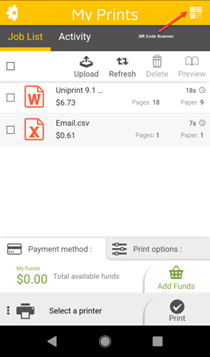
Touchless Printing is simple and fast: simply walk up to a printer and use the Pharos Print app (iOS and Android) to scan the QR Code next to the printer’s touch screen. You can manage your print jobs in your queue and confirm or change job details right from your mobile device—without ever touching the printer!
The QR Code scanner can be found in the upper right corner of the mobile app. If you don’t have the Pharos Print app installed, you can scan the QR Code from your camera app. This will launch My Print Center via a web browser. After logging in, you can release all of the jobs in your queue. Please note that it is not possible to select individual jobs or adjust print settings when releasing print jobs using this method.
Touchless Printing: Frequently Asked Questions
I released my print jobs, but nothing printed. What’s wrong?
If there is an error with the printer you tried to release your jobs at, your jobs will not be released, and your print quota will not be affected. The system is unable to send an error message to your device, but your jobs will remain in your queue and you will be able to release them at another printer.
I scanned the QR code with my phone, but it is not letting me change any settings or select what jobs I want to print. What's wrong?
To access these options, please scan the QR code using the Pharos Print app. Scanning the QR code with your camera app or QR code reader will open print.pitt.edu in a browser and only allow you to release all jobs in your queue.
How do I scan QR Codes using the Pharos Print app?
To scan QR codes using the Pharos Print app, tap the QR icon in the upper right corner of the app.
The printer is printing someone else’s jobs. Can I release mine now?
Yes, but they will be mixed in with the other person’s print jobs. It is best to wait until the printer stops printing before releasing your jobs.
MobilePrint: Pharos Print App
The Pharos Print app provides a Pitt Print solution for iOS and Android devices. Both versions allow users to upload print jobs, view jobs in the print queue, change print options on those jobs, and view the print quota for the account.
Installing and Using the Pharos Print App
- Download the Pharos Print app from the Apple App Store or Google Play by searching for "Pharos Print" by Pharos Systems International. The app is also available from the Pitt App Center by searching for "Pitt Print App (Pharos)".
- Enter print.pitt.edu for the server address.
- Enter 443 for the server port.
- Click Connect.
- Log in with your Pitt username (without @pitt.edu) and university password and click Log On.
Android
The Android version of Pharos Print contains many of the features of My Print Center. You can upload documents by clicking the Upload button and selecting any supported file on the Android file system. Features such as viewing print quota, deleting jobs from the queue, editing print options, and viewing job activity work similarly to the web interface of My Print Center.
iOS
The iOS version of Pharos Print allows users to view jobs in the queue, edit print options, and see the remaining print quota on the account.
Supported files can be uploaded with the Pharos Print App. Unlike My Print Center and the Android app, there is not an upload button, but supported files can be uploaded by loading the file and sharing it with the Pharos Print app.
Open the file to be uploaded and click the iOS share icon. From the list of apps that the file can shared with, click the "More" icon. Enable "Share with Pharos Print" and click "Done." You will now see "Share with Pharos Print" along with the other app options. Click this icon and then click "Print" to confirm the upload to Pharos Print.
Printing from Personal Computers
Print from your Windows or macOS computer by installing the Pitt Print Client. The Pitt Print Client gives you all of the same printing options as if you were printing to a personal printer. This is the preferred way to send print jobs.
Using Your Personal Computer with Pitt Print
- Ensure the Pitt Print Client is installed, see the Installing the Pitt Print Client section below.
- Open the file you would like to print and select the Print command.
- A Print window will display. Select the printer named either Pitt Color Print Station or Pitt B&W Print Station and click OK.
- A Pharos Print Job Details (Windows) or Pharos Popup (macOS) window will appear. Enter your University Computing Account username and password then click Print.
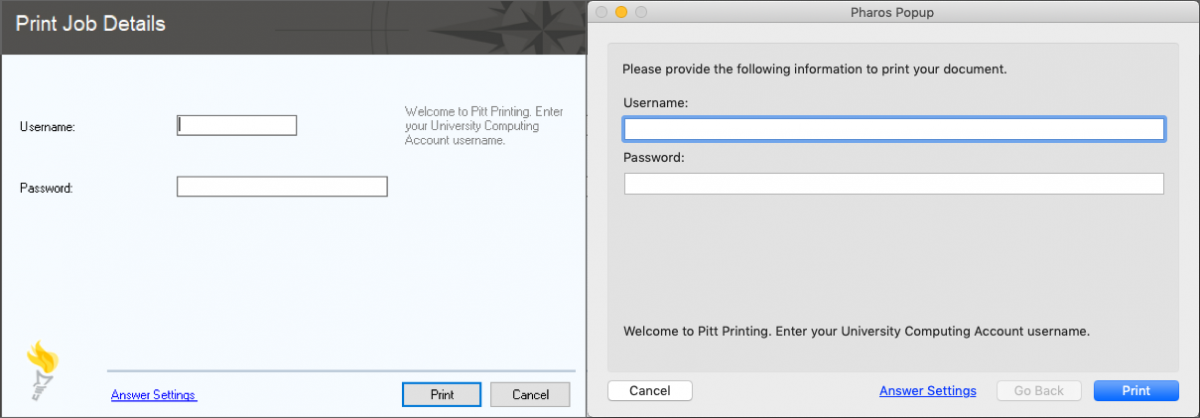
Note: If you send additional print jobs during the same login session on your computer, you do not need to retype your credentials. Instead, your password will be cached and you can proceed to step 5.
- Your print job is sent to the print queue. You may release your print job from any Pitt Print Station.
Installing the Pitt Print Client
-
The Pitt Print client is available for 32-bit and 64-bit versions of Windows 8 and 10, as well as macOS 10.12 and higher. To use the service, install the required Pitt Print Client from the Software Download Service via My Pitt (my.pitt.edu).
Determine if your Windows Computer Uses a 32-bit or 64-bit Operating System
If you are using a Mac, skip the instructions in this section.
The Pitt Print Client for Windows is available for download via the Software Download Service via My Pitt (my.pitt.edu) as a 32-bit or a 64-bit version. Before beginning a Windows download, use the following instructions to determine whether your computer is running a 32-bit or 64-bit version of Windows:
- Move the cursor to the lower-left corner of the screen to see a Windows thumbnail tile.
- Right-click the tile and select System.
- Under System, you can view the System type information. This will tell you if it is a 32-bit or 64-bit computer.
- Close any open windows.
-
Configure Your Computer
To download the Pitt Print client, complete the following steps:
- Log in to the Software Download Service via My Pitt (my.pitt.edu) using Pitt Passport.
- Click "I hereby agree to the terms mentioned in this page" and "Agree and Close" to continue.
- Search for "Pitt Printing Client" using the search bar or locate the "Pitt Printing Client" entries in the Popular section.
- A list of matching results will display. Click the Pitt Print Client link for the version of the download that you need.
- Click the Download button to display the download link. Click the file download for the Pitt Printing Client and the download will begin.
Windows
- Double-click the downloaded file to launch the installer.
- Click the Install button to begin the installation.
Note: If you see a security warning, you must agree to it before the installation can proceed
macOS
- Open the downloaded Pitt Print Client disk image.
- Next, double-click the Pitt Printing Client file to launch the installer.
- Click the Continue button.
Note: If you see a security warning, you must agree to it before the installation can proceed.
Note: During the installation, Mac users will be prompted to enter the username and password for their computer.
- Follow the prompts to complete the installation process.
- To log out of the Software Download Service, close your web browser.
- The Pitt Print Client has now been installed on your computer.
MobilePrint: Printing from Email
MobilePrint is an extension of the Pitt Print service that makes it simple to print from devices that do not support the Pitt Print Client such as smartphones, tablets, and Linux computers. Simply send an email message with the file that you want to print attached or enter the information that you want to print in the body of the email message.
Using MobilePrint
- Log in to your email account (either Pitt or personal)
- Jobs can be sent to one of the following email addresses:
- Attach a document to the email message
- Only one document can be attached for printing in each email.
- If more than 400 characters are written in the body of the email, the system will also make a printout for the body of the email.
- After the email is sent, you will get a confirmation email saying the job is ready or failed to process.
- Once the job is ready, you may release your print job from any Pitt Print Station.
MobilePrint: Frequently Asked Questions
What email address can I use to send jobs for MobilePrint?
Any email account (Pitt or third party) can be used with MobilePrint. However, you must register your email account to use MobilePrint.
How do I register my email address to use MobilePrint?
The first time you send a print job via MobilePrint, you will receive an email message prompting you to register your email address. Follow the link provided in the email message and log in to My Print Center using Pitt Passport. Your email address will then be automatically registered in the MobilePrint system, and your print job will process. You may use more than one email address if you wish, such as your Pitt Email and a Gmail account. Keep in mind that you will need to register both addresses.
Do I need to install any special software or apps to use MobilePrint?
No additional software is needed to print. MobilePrint will work with any software that can send email.
Do I have to be on campus to use MobilePrint?
No, you can use MobilePrint from anywhere that you are able to send emails.
What file types are supported by MobilePrint?
- Adobe PDF (.pdf)
- Microsoft Word (.doc, .docx)
- Microsoft Excel (.xls, .xlsx, .xlt)
- Microsoft PowerPoint (.ppt, .pptx, .pptm)
- Open Office (.odt, .ods, .odp)
- Images (.jpg, .gif, .png)
- Text (.txt, .rtf, .csv)
Can I print more than one file in an email message?
You can only attach one document per email. The system will then process the attachment and the body of email if it is greater than 400 characters.
What if I don’t receive the email confirmation?
Check your spam filter for the notice and make sure that the address mobileprint@pitt.edu or colorprint@pitt.edu is on the approved senders list.
Can I print two-sided documents with MobilePrint?
Yes. All jobs are sent as duplex (two-sided) print jobs by default.
Do advance printing features such as printing multiple presentation slides on a single sheet of paper, printing certain pages of a document, collation options, etc. work with MobilePrint?
Print options can be changed through My Print Center (additional information in the My Print Center section). Options include color/black & white, single- or double-sided, 1 or 2 pages per side, and number of copies.
For more advanced printing options or the ability to print file types not supported by MobilePrint, print from a Windows or macOS computer using the Pitt Print Client or from any of the computers in the Student Computing Labs.
MobilePrint: Pharos Chrome Print Extension - Printing from Chrome Browsers and Chrome OS
NOTE: Google Cloud Printing will be retired by Google at the end of 2020. A new method for Chrome printing has been implemented on the Pitt Print system: Pharos Chrome Print Extension.
Pharos Chrome Print Extension allows Chrome OS users a native method of printing without having to send an email or upload files to My Print Center. Jobs printed through Pharos Chrome Print Extension will be accessible in the same way as any other Pitt Print job.
Pharos Chrome Print Extension Printing: Frequently Asked Questions
Why would I use Pharos Chrome Print Extension?
Pitt Print only offers native printing clients for Windows and macOS computers. This provides a native printing option for Chrome OS devices.
What account should I use for Pharos Chrome Print Extension through Pitt Print?
The personal Google account that you use to log into your Chrome OS device.
How do I print with Pharos Chrome Print Extension?
While using a Chrome OS application, choose the print option, choose Pitt Print Chrome Printer as your printer, set your printing options, and click Print. Your job will process and be sent to the Pitt Print queue.
Please note that it may take a few minutes for the print job to appear in your Pitt Print queue.
Can I print with custom settings using Pharos Chrome Print Extension?
Yes, you are able to choose color or black & white printing and portrait or landscape layout.
Can I print double-sided documents with Pharos Chrome Print Extension?
Yes. All jobs are sent as duplex (two-sided) print jobs by default.
Do advance printing features such as printing multiple presentation slides on a single sheet of paper, printing certain pages of a document, collation options, etc. work with Pharos Chrome Print Extension?
Print options can be changed through My Print Center (additional information in the My Print Center section). Options include color/black & white, single- or double-sided, 1 or 2 pages per side, and number of copies.
For more advanced printing options, print from a Windows or macOS computer using the Pitt Print Client or from any of the computers in the Student Computing Labs.
Printing in the Student Computing Labs and Pitt IT Virtual Labs
Both color and black & white printers are available in most Student Computing Labs. By default, print jobs sent from a lab computer are sent to black & white Pitt Print stations.
Note: The Bellefield Hall Lab does not have color printing.
Using the Student Computing Labs to Print
- Open the file you would like to print and select the Print command.
- A Print window will display. Select the printer called Pitt Color Print Station or Pitt B&W Print Station A/B (either A or B will work) and click OK.
- Your print job is sent to either the color or black & white print queue.
- You may release your color print job from any color Pitt Print Station, or black & white print job from any black & white Pitt Print Station on campus.
Printing from Unix
The lpr command prints files on Unix. Use the -Pqueuename option to select a printer.
Example: lpr -Ppittprint sample.file
This is the default output: Single-sided output, one page worth of text per side, portrait format. Output is queued to the Pitt Print Stations.
Note: The Unix operating system is case sensitive. Type all commands in lower-case letters unless noted otherwise.
Pitt Print Station Locations
The map linked below lists all the Pitt Print Station locations. For a list of currently open stations, please consult the three accordions below.
See locations in Google Maps
Complete List of Print Station Locations — B&W Printing
Printing is $.07 a sheet on these printers.
Printer locations are open based on the building and room operating hours which may change without notice.
This is only a list of printer locations and does not indicate the printers are currently available.
University of Pittsburgh - Pittsburgh
- Available to All students
- Bellefield Hall Student Computing Lab Classroom (314)
- Benedum Hall Student Computing Lab (B-06)
- Bevier Engineering Library (G33 Benedum Hall)
- Bruce Hall Lobby (ground floor lobby)
- Cathedral of Learning Student Computing Labs (G-17, G-25, & G-27)
- David Lawrence Hall Student Computing Lab (230 & outside the lab)
- Forbes Hall (ground floor lobby)
- Frick Fine Arts Library
- Hillman Library (ground, 3rd, and 4th floors)
- Litchfield Towers (ground floor lobby)
- O'Hara Student Center (2nd floor)
- Petersen Events Center (food court)
- Scaife Hall (Falk Library)
- Sutherland Hall Student Computing Lab (120 & outside the lab) **
- Wesley W. Posvar Hall (Ground floor)
- William Pitt Union (Lobby)
- Restricted access (only students with building or room access can get to these printers)
- Amos Hall Lobby (ground floor lobby)
- Barco Law Building (ground & 1st floors)
- Bouquet Gardens, Building J (near mailroom)
- Brackenridge Hall (ground floor lobby)
- Bridgeside Point 100 (1st and Suite 350)
- Centre Plaza Apartments (Lobby)
- Chevron Science Center (ground floor lobby)
- Forbes-Craig Apartments (1st floor lounge)
- Forbes Tower (4th floor lobby and 4011)
- Information Sciences Building (3rd floor Student Collaboration Area)
- Irvis Hall (near mailroom)
- Langley Hall Lobby (ground floor lobby)
- Lothrop Hall (ground floor lobby)
- McCormick Hall (ground floor lobby)
- Mervis Hall (118 Business Library & Graduate Study Lounge)
- Nordenberg Hall (3rd floor)
- Panther Hall (near mailroom)
- Petersen Events Center (Athletics lab)
- Public Health Building (1114A)
- Residence Inn on Bigelow Boulevard Hotel/Dorm (Lobby)
- Ruskin Hall (near mailroom)
- Salk Hall (4th & 5th floors)
- Sennott Square (2nd floor)
- Trees Hall (127)
- Victoria Hall (213)
- Wesley W. Posvar Hall (5604)
University of Pittsburgh - Greensburg
- Chambers Hall Lobby
- Village Hall Lobby
- Smith Hall Lounge
- Cassell Hall Computing Lab (inside and outside locations)
- Cassell Hall 116
- Westmoreland Hall
- Robertshaw Hall
- College Hall
- University Courts
- Millstein Library
- McKenna Hall 136 and 137
University of Pittsburgh - Johnstown
- Blackington 225
- Blackington 228
- Blackington 230
- Blackington 235
- Blackington 237
- E&S Chem Engineering 218
- E&S Chem Engineering 238
- Living Learning Center
- Owen Library
- Owen Library 209
- Owen Library Academic Success Center
- College Park Apartments (Dorm)
- Buckhorn (Dorm)
- Willow (Dorm)
- Briar (Dorm)
- Student Union
Complete List of Print Station Locations — B&W Multifunction Printers
Printing and copying is $.07 a sheet on these printers.
Multifunction Print+Copy Stations allow users to:
- Make photocopies using available print quota or purchased print funds
- Scan to a USB drive for free (must be formatted as FAT32).
- Scan to email for free.
- Release Black and White print jobs in your queue
Multifunction Printer Locations:
Printer locations are open based on the building and room operating hours which may change without notice.
This is only a list of printer locations and does not indicate the printers are currently available.
- Available to All students
- Bellefield Hall Student Computing Lab Classroom (314)
- Benedum Hall Student Computing Lab (B-06)
- Cathedral of Learning Student Computing Labs (G-27)
- David Lawrence Hall Student Computing Lab (230)
- Scaife Hall (Falk Library)
- Sutherland Hall Student Computing Lab (120)
- Restricted access (only students with building or room access can get to these printers)
- Chevron Science Center (ground floor lobby)
- Langley Hall Lobby (ground floor lobby)
- Mervis (Graduate Study Lounge)
Complete List of Print Station Locations — Color Printers
Printing in Black and White at these printers is $.21 a sheet and printing in color is $.49 a sheet.
Printer locations are open based on the building and room operating hours which may change without notice.
This is only a list of printer locations and does not indicate the printers are currently available.
University of Pittsburgh - Pittsburgh
- Available to All students
- Cathedral of Learning Student Computing Labs (G-27)
- Benedum Hall Student Computing Lab (B-06)
- David Lawrence Hall Student Computing Lab (230)
- Hillman Library (ground floor)
- Scaife Hall (Falk Library)
- Sutherland Hall Student Computing Lab (120)
- Restricted access (only students with building or room access can get to these printers)
- Barco Law Building (1st floor)
University of Pittsburgh - Johnstown